Tip Toeing in My Jordans GIF: Find One or Make Your Own
Get a tip toeing in my Jordans GIF two ways: grab one from GIPHY, or turn your own photo into one. Exact settings so it fits X, Discord and GIPHY limits.
 Tip Toeing in My Jordans
Someone in the group chat just did something sneaky, and the only right reply is the little imp tip toeing in the straw. You need a tip toeing in my Jordans GIF, and you need it now.
There are two ways to get one. Grab a ready-made one from a GIF library, or make your own from a photo of the person who deserves it. The first takes ten seconds. The second takes a few minutes and lands a lot harder. This guide covers both, with the exact settings that keep your GIF under the size limits of X, Discord and GIPHY.
Where to find a tip toeing in my Jordans GIF
The fastest route is a GIF search.
- GIPHY: search "tip toeing in my Jordans". GIPHY has an explore page for the tag with the 2026 imp, the 2014 Vine era and plenty of remixes.
- Tenor: the GIF library behind many phone keyboards. Type the same phrase.
- In-app pickers: X, Discord, Slack and iMessage all have a GIF button. Most pull from GIPHY or Tenor, so the results look alike.
Two things to know about ready-made GIFs. They have no sound; a GIF is pictures only. And they show someone else. If you want your friend, your dad or your dog doing the dance, you have to make it.
How to make a tip toeing in my Jordans GIF from your own photo
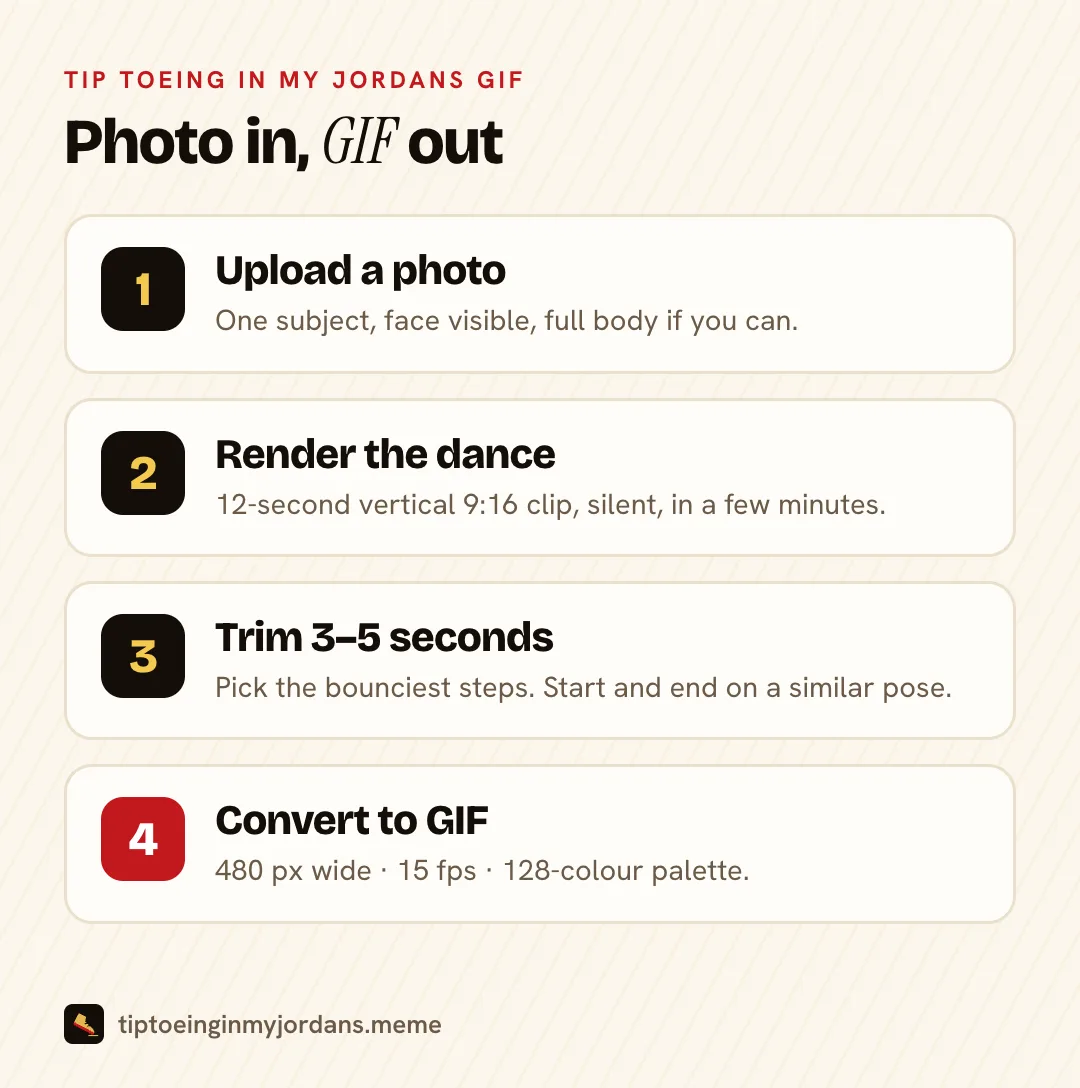
The plan: turn a photo into a short tip toe video, cut the best few seconds, then convert that to a GIF. Converting from video gives you a much cleaner GIF than screen-recording someone else's post.
Step 1: Turn your photo into a tip toe dance clip
Open our tip toeing in my Jordans meme generator and upload one photo. The generator does best with:
- One subject, face visible, decent light. Group shots confuse the dance.
- Full body beats a close-up. The joke is in the feet. A headshot has no feet to tip toe with.
- Pets and drawings work. A dog up on its hind legs is a strong GIF.
Then describe the scene. A prompt that matches the meme:
Make the person in this photo do a slow, creepy tip toe dance in a candlelit, straw-filled barn, old film grain, vertical 9:16.
You get a 12-second vertical clip in 768P or 2K, usually within a few minutes. Every render is kept as its own take, so you can ask for a slower shuffle or a closer camera without losing the first one. If a render fails, the credits come back.
The clip is silent. That matters less here than anywhere else, because a GIF can't play sound at all.
Step 2: Trim the clip to the best 3 to 5 seconds
A 12-second clip is too long for a GIF. Long GIFs get huge, and the joke lands in the first few steps anyway.
Watch your clip and find the stretch where the bounce is clearest. Three to five seconds is the sweet spot. A good loop starts and ends at a similar pose, so the jump back to the start is hard to spot.
You can trim inside the converter in the next step, so there is no need for a separate editor.
Step 3: Convert the MP4 to a GIF
Pick the easy route or the precise one.
Easy: ezgif. Open ezgif's video to GIF converter, upload your MP4 (it accepts files up to 200MB), set the start and end time, and choose:
- Size: 480 px wide
- Frame rate: 15 fps
Press convert, then download.
Precise: ffmpeg. If you have ffmpeg installed, this one command trims 4 seconds starting at second 2, scales to 480 px wide at 15 fps, and builds a custom colour palette so the candlelight doesn't band:
ffmpeg -ss 2 -t 4 -i tiptoe.mp4 -vf "fps=15,scale=480:-1:flags=lanczos,split[a][b];[a]palettegen=max_colors=128[p];[b][p]paletteuse=dither=bayer:bayer_scale=3" -loop 0 tiptoe.gif
We ran this exact command while writing this guide. From a 9:16 source it gives a 480 x 854 GIF with 60 frames that loops forever.
Why the palette step? A GIF can only hold 256 colours. Without a palette built from your own clip, warm gradients like candlelight turn into stripes.
Step 4: Check the size against where you'll post it
Every app has its own limit. Check the file size before you send, or the upload will fail with a vague error.
Tip toeing in my Jordans GIF size limits by platform
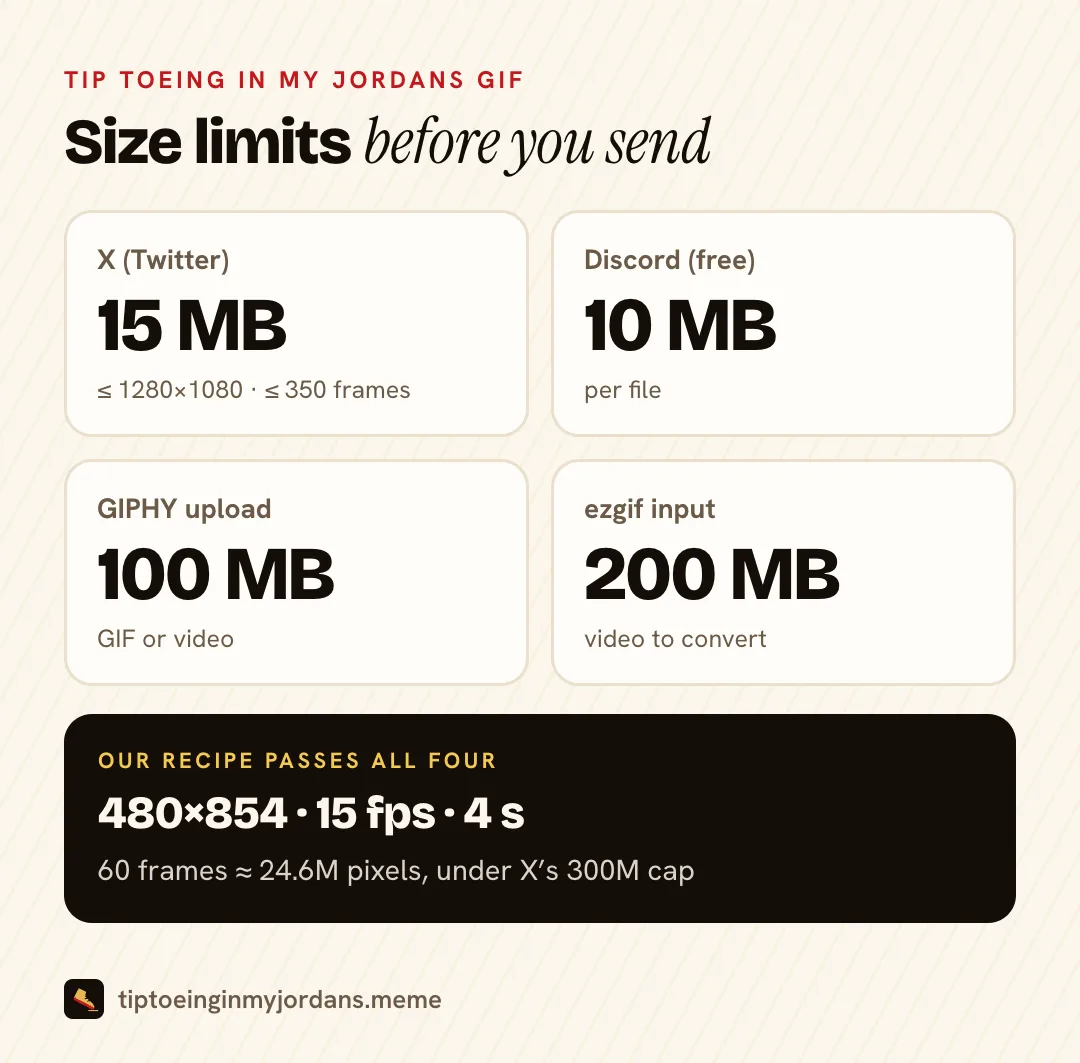
| Where | Limit | Source |
|---|---|---|
| X (Twitter) | 15MB per animated GIF; keep it within 1280 x 1080, 350 frames and 300 million total pixels | X developer docs |
| Discord, free account | 10MB per file | Reported when Discord lowered the cap in 2024 |
| GIPHY upload | GIFs or videos up to 100MB | GIPHY developer docs |
| ezgif input | Videos up to 200MB | ezgif |
The frame math nobody mentions
X's limits catch vertical clips in two ways.
Height. X recommends GIFs no bigger than 1280 x 1080. A full-size 9:16 GIF is taller than 1080 px, so it can fail even when the file is small. At 9:16, the tallest safe size is about 608 x 1080. Our 480 x 854 setting stays well inside it.
Frames. X suggests no more than 350 frames. If your source clip runs at 30 fps, all 12 seconds is 360 frames, just over the line. Cutting to 4 seconds at 15 fps gives 60 frames.
Total pixels. X's ceiling is width x height x frames under 300 million. Our 480 x 854 x 60 GIF is about 24.6 million. Even the full 12 seconds at 15 fps (180 frames) is about 73.8 million, still under.
So the 480 px, 15 fps, 3 to 5 second recipe passes every check on this page with room to spare.
GIF or MP4: which should you post?
Use the format the place expects.
- TikTok, Reels, Shorts: post the MP4. These apps want video, and that is where you can add Riff Raff's "Tip Toe Wing In My Jawwdinz" from the licensed sound library. The story of that track is in the Riff Raff song explained.
- Group chats, Discord, Slack, replies on X: post the GIF. It autoplays, loops and needs no sound.
- GIPHY: upload the GIF if you want it to show up in other people's keyboards.
A GIF is also several times bigger than the same seconds of MP4. If a chat app accepts video, a short MP4 looks better at a smaller size.
Fixing a bad tip toeing in my Jordans GIF
It's too big. Drop to 360 px wide, or cut to 3 seconds. Reducing colours from 128 to 64 also helps. Do these before lowering the frame rate below 12 fps, which makes the dance look choppy.
The background is stripy. That is colour banding. Use the palette step from the ffmpeg command, or raise the colour count back toward 256.
The loop jumps. Move the start or end by a few frames until the poses match. A 0.2-second change is often enough.
The face looks off. Go back a step. Try a clearer photo or a new render, not a different GIF setting.
Tip toeing in my Jordans GIF FAQ
Does a tip toeing in my Jordans GIF have sound?
No. GIF is an image format with no audio track. If you want the Riff Raff song, post the video instead and add the sound in TikTok, Instagram or CapCut.
Can I put my own tip toeing in my Jordans GIF on GIPHY?
Yes. Make a free GIPHY account and upload it. Only upload GIFs of people who agreed to it, and don't present a generated clip as real footage.
What size should a tip toeing in my Jordans GIF be?
480 px wide at 15 fps, 3 to 5 seconds long. That fits X, Discord and GIPHY limits.
Why is my GIF so much bigger than the video?
GIF compresses each frame on its own and is limited to 256 colours. Video formats like MP4 reuse what stays the same between frames, so they come out far smaller.
Make your own tip toeing in my Jordans GIF
Ready-made GIFs show strangers. Yours can show your friend tip toeing through the straw. Upload a photo, get the clip, convert it with the settings above. Start your tip toeing in my Jordans GIF.
New to the meme? Read where it came from in our Rumpelstiltskin meme explainer.
Sources
- Media best practices, X developer docs
- Upload API, GIPHY developers
- Discord limits file size for free users to 10MB, GIGAZINE, 2024
- Video to GIF converter, ezgif
- FFmpeg filters documentation: palettegen and paletteuse, FFmpeg
- GIF, Wikipedia
- Tip toeing in my Jordans GIFs, GIPHY
- AI Rumpelstiltskin "Tip Toein' In My Jordans", Know Your Meme, 2026
- Tip Toe Wing in My Jawwdinz, Wikipedia
This site is an independent fan tool. It is not affiliated with Riff Raff, GIPHY, Tenor, or the artists behind the original AI clip.